
Dynamic tagging and grouping
Dynamic tagging and grouping empower IT technicians with automation that streamlines device management, allowing for precise and efficient organization based on predefined conditions.
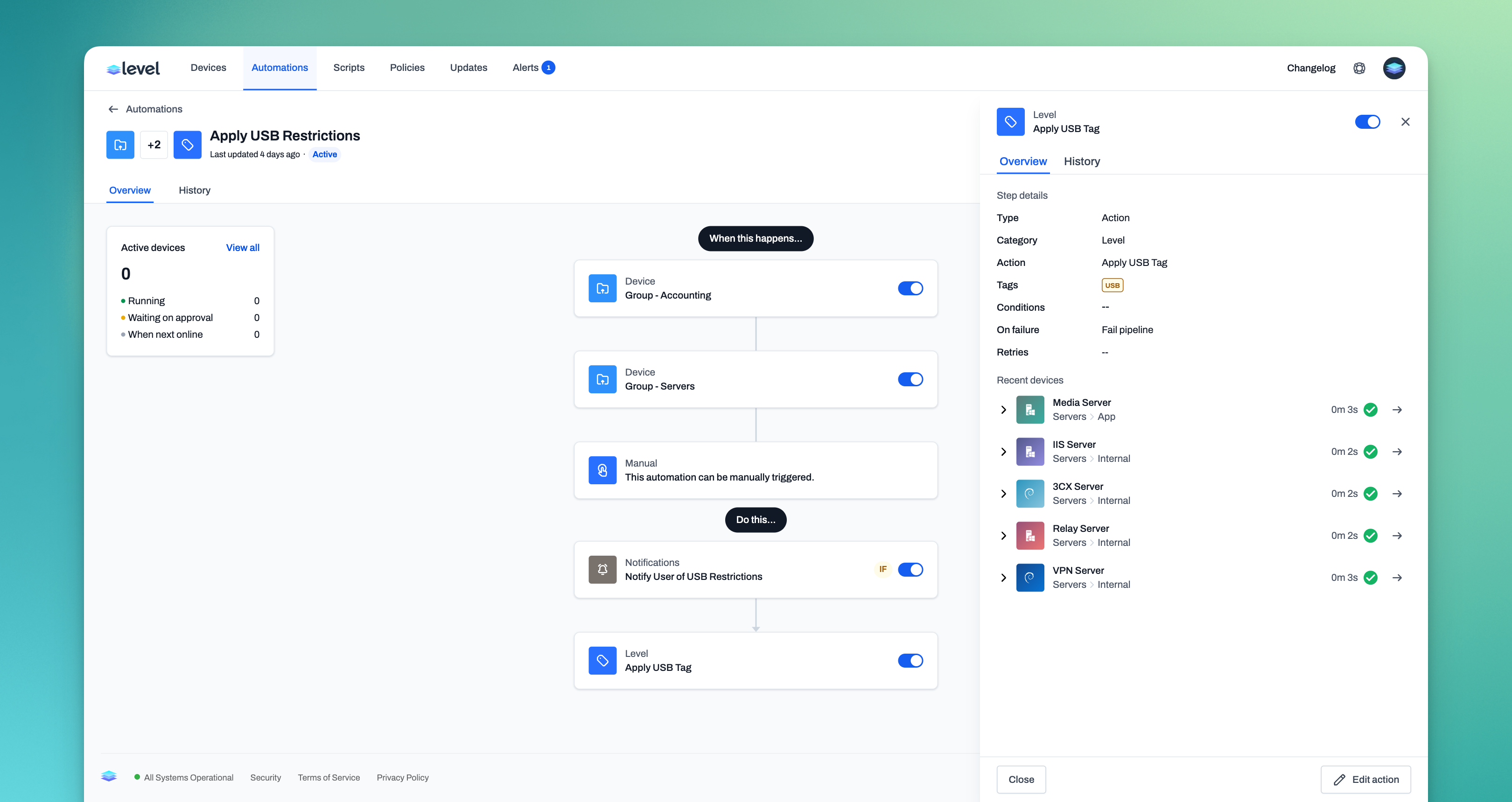
Dynamic tagging
While the release of automations has been wonderful and very well-received, it's time we start tapping into it's full scope and potential, starting with dynamic tagging. Dynamic tagging allows the application of tags to devices based on predefined conditions. The automation of tagging reduces manual overhead and ensures that devices are always correctly categorized, improving the efficiency of device management. Furthermore, dynamic tagging facilitates precise targeting for deployment of updates, patches, or configurations, ensuring that only relevant devices are affected. This not only streamlines operational workflows but can also enhance security by enabling quick response to vulnerabilities through targeted actions. A standout feature of dynamic tag trigger functionality is the capability to automate tasks based on specific tags. For instance, when you assign the "Office" tag to a device, it can automatically initiate an office setup pipeline, seamlessly installing office-related software on the tagged device. This streamlines the process, making device management more efficient and tailored to your operational needs. With dynamic tagging, multiple new triggers and actions have been added. These include the Tag Applied and Tag Removed triggers as well as the Add Tags and Remove Tags actions. With these four steps, an entire automated world awaits your ensemble of devices.
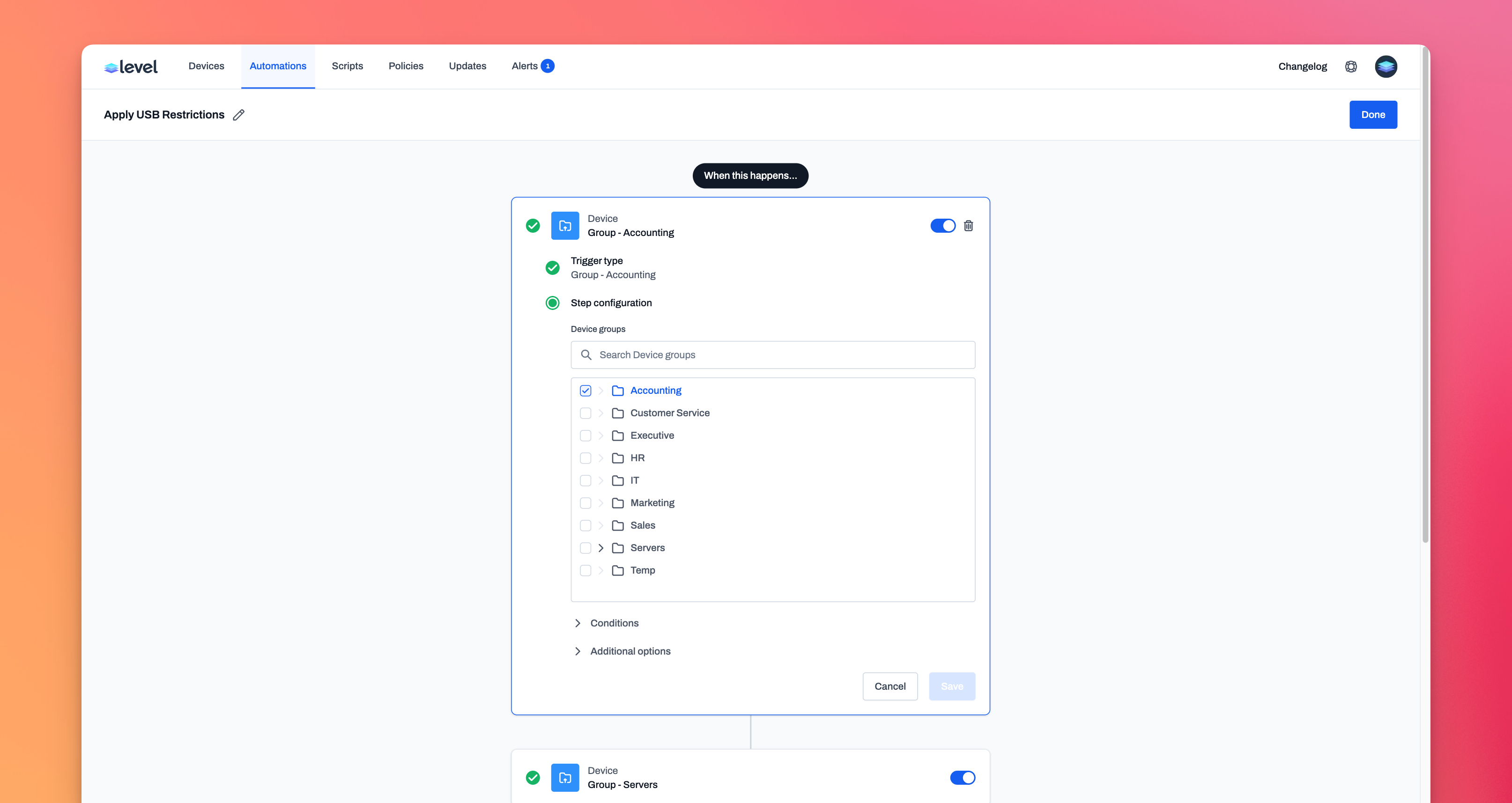
Dynamic grouping
What would dynamic tagging be without dynamic grouping, a powerful and agile method of organizing and configuring your devices in Level. With dynamic grouping, you can automatically move devices in and out of groups based on specific conditions, allowing IT techs to manage devices with unprecedented flexibility and precision. By automating group assignments, dynamic grouping can be used for device organization that accurately reflects the current state of your device network, adapting to changes without manual intervention. This adaptability is crucial for maintaining optimal performance and security posture. Dynamic grouping, much like dynamic tagging, also simplifies management of diverse device ecosystems, making it easier to apply policies, perform mass updates, or isolate devices for configuration or troubleshooting. With a reduction in oversight required, you and your team can ensure that your devices are managed according to the attributes and needs you deem fit. Dynamic grouping also introduces new triggers and actions to the automation pool. These include the Device Enters Group and Device Leaves Group triggers as well as the Assign To Group action. Three new steps to usher in your suite of devices into a fully automated ecosystem.
Improvements
- We've added an automation action that allows you to enable and disable maintenance mode on a device.
- The "Device Created Trigger" now waits sixty seconds before firing. This gives the device more time to report it all of it's system properties so that they will be ready for condition filtering.
- Show "queued" devices in the "Active" section of the automation device side panel. This means that devices will appear in the panel more quickly
- Show the status of an automation run in the "Completed" tab of the device side panel.
- You can now filter the automation history list by the status of run.
- The automation history table can now be sorted by the start time of the run.
- Triggers and actions can now have conditions based on the group the device is in.
Bug fixes
- Fixed a bug that caused runs in history to always show a "Manual" trigger
- Remove duplicate values in the operating system condition dropdown for actions and triggers.
- Fixed a bug with the userservice on macOS. This bug occured randomly and would prevent remote control from working until the system restarted.
- Fixed a timing bug related to canceling an action immediately after it started. This would sometimes cause the action to continue processing.
- The "Notify User" desktop elements were appearing directly behind it other if there was more than one. They now stack in a way that makes it obvious that more exist.