
Bring your own AI with Level CLI
This release gives teams new ways to extend Level and coordinate work across their environment. Use the Level CLI with supported AI coding agents to manage devices, build automations, and handle repetitive tasks using the AI tools your team already prefers. The new Run automation on another device action also makes it possible to connect workflows across managed devices and pass variables between automations. Rounding out the release are usability and performance improvements, along with fixes that make Level more reliable across day-to-day workflows.

Bring your own AI with Level CLI
Level CLI gives you direct terminal access to your devices, alerts, scripts, automations, monitors, updates, groups, and more. Run commands yourself, or connect the CLI to Codex, Claude Code, Gemini, or another coding agent and describe the outcome you need. Your coding agent can inspect device context, investigate alerts, run diagnostics, propose fixes, execute scripts across groups, and wait for the results. It can also create and update monitors and automations as code, with diff and dry-run support so you can review changes before applying them. Because humans and coding agents use the same CLI, actions remain governed by the permissions of the Level user running them and are recorded in Level’s audit history. From troubleshooting a single endpoint to patching or remediating an entire fleet, Level CLI brings the full power of Level into your terminal. Read more about the CLI in our documentation: https://docs.level.io/en/articles/16601525-level-cli-lvl-get-started
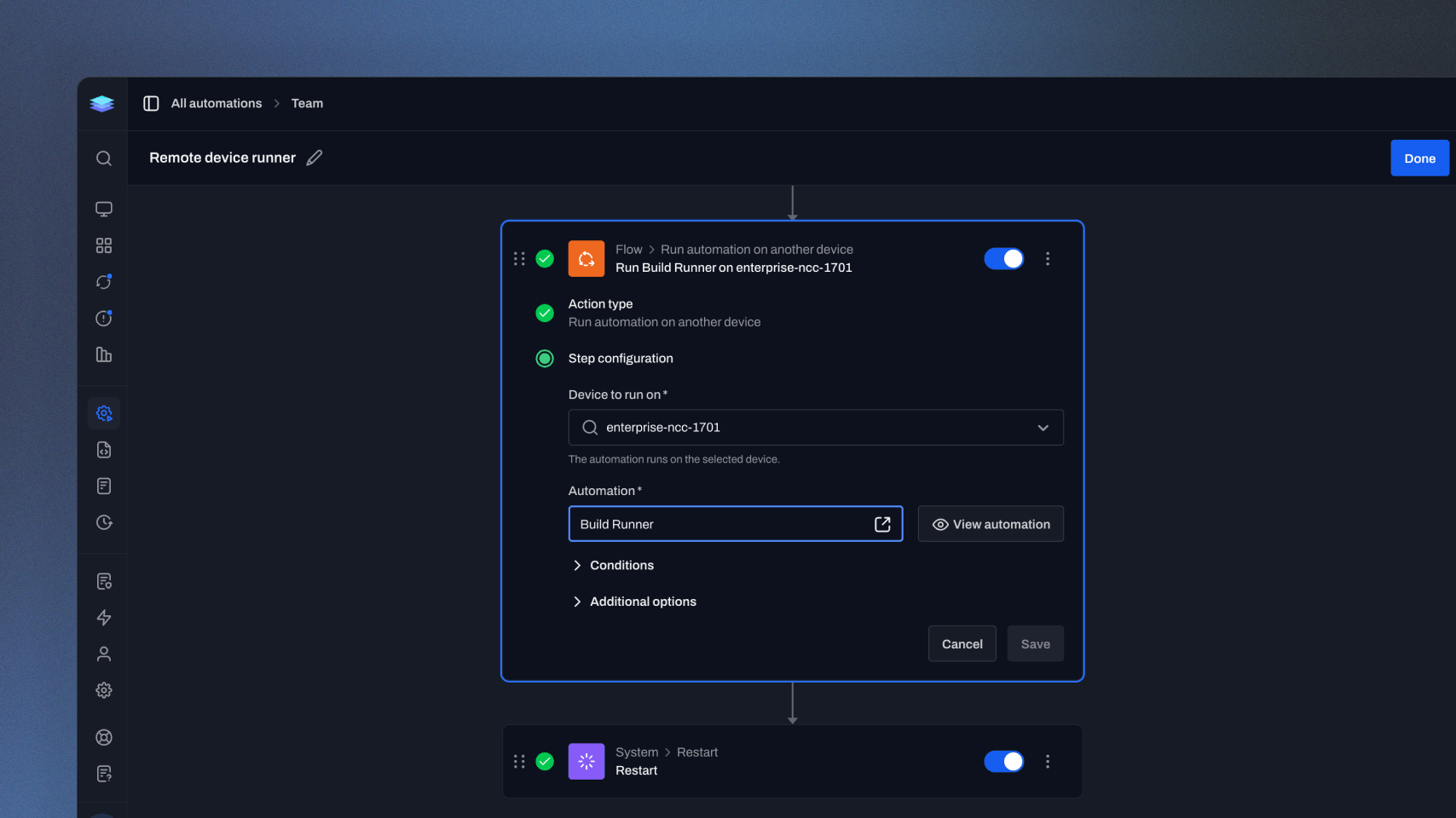
Run automation on another device
Build workflows that coordinate work across multiple devices. With the new Run automation on another device action, an automation running on one endpoint can launch a selected automation on another managed device, such as a server or dedicated runner. Map variables between the two automations to carry important context forward and keep the entire process connected.
Improvements
- Run Automation actions can now pass variable values into the automation they start, so child automations can use values from the parent run.
- More Level forms now warn before you leave with unsaved changes, including settings, integrations, scripts, roles, and tag settings.
- More tables now load only the data needed for visible columns, improving performance in larger environments.
- Resolving alerts in bulk now gives clearer confirmation, error, and completion feedback.
- PSA integrations now handle slow or unreachable vendor APIs more predictably, with bounded timeouts and better retry handling.
Bug fixes
- Scheduled and webhook-triggered automations now honor operating-system conditions when selecting devices.
- Fixed a rare case where an automation run could get stuck as active after Level exhausted retries while processing a step.
- Automation conditions now reject unsupported operators and trigger combinations more consistently.
- Clearing a custom field value now correctly restores the inherited value when one exists.
- Bulk tag menus on the Devices table now correctly show the tags already applied to the selected devices, including mixed selections.
- Update table bulk actions now clear stale selections when filters or device scope changes.
- Webhook trigger example commands now include the correct auth-header line continuation.
- Zest company lookups now handle successful responses that omit a content-type header, preventing group-mapping errors.
- Microsoft 365 for Windows installs now handle temporary cleanup file locks more gracefully, so cleanup warnings do not override the actual install result or reboot status.
- macOS user service status checks now read launchd output more reliably, preventing running user services from being reported as stopped.
- OIDC SSO setup can accept providers that omit response_modes_supported, while still validating compatible providers when that metadata is present.
- Scheduled automation trigger forms now show the correct weekday when local time conversion crosses a week boundary.
- Device ping history now displays time labels more accurately for non-US date formats.
- Remote control connections now handle queued WebRTC candidates more reliably during startup.
- Remote control connection errors now show clearer fallback messages when a specific error is unavailable.
Feedback delivered in this release
Follow the requests that helped shape this update.