
Wait for input and logged-in users
Automations can now pause for technician input or wait for a user to log in before continuing, making workflows more flexible and reusable.
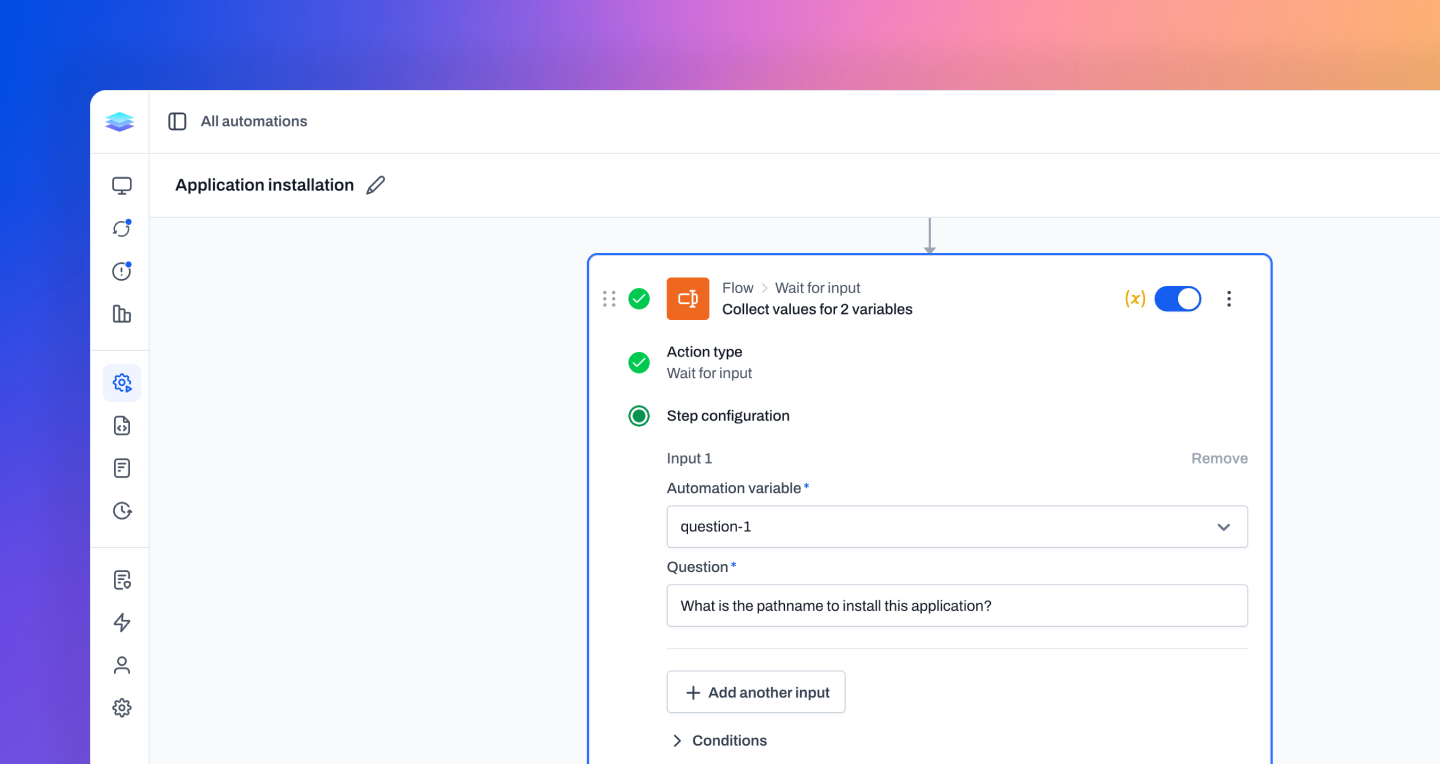
Wait for input
Automations can now collect information while they’re running. The new Wait for Input action pauses a run, asks a technician for the values needed to continue, then makes those answers available as runtime variables for the remaining steps. This makes automations much more reusable. You can build the workflow once, then provide the details for each run at the moment they’re needed, without editing the automation or creating one-off copies. Runs waiting on input are clearly labeled, and technicians can answer them from run details or in bulk when the same values apply across multiple devices.
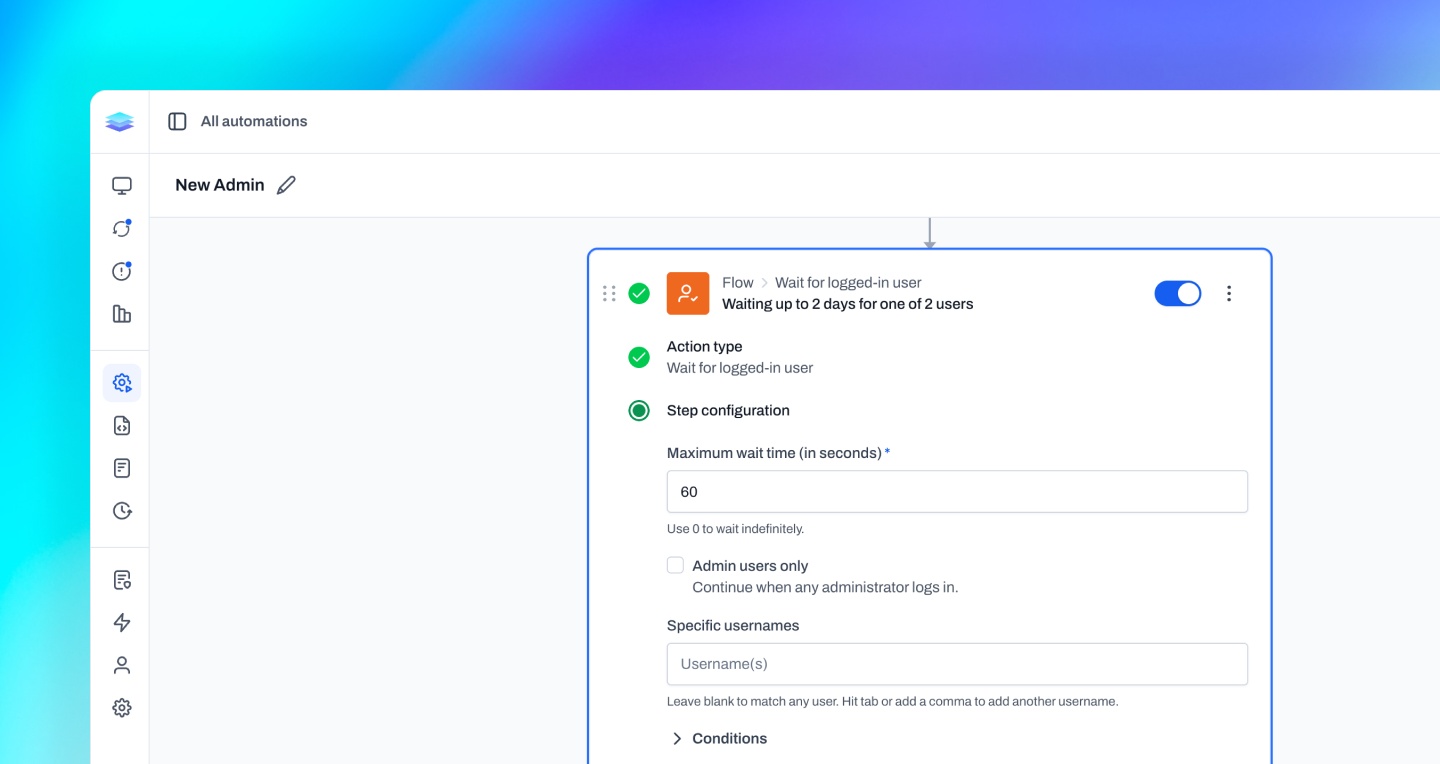
Wait for logged in user
Automations can now wait for someone to be signed in before continuing. The new Wait for Logged-In User action pauses the run until the device has an active user session, then automatically continues with the remaining steps. This is useful for steps that need to run in the signed-in user’s session. Instead of running too early or requiring a technician to time the automation around a user being present, the run waits until the device is in the right state.
Improvements
- Automation conditions can now use Level system variables, letting workflows branch on built-in device state without creating custom fields first.
- Monitor policies can now be filtered by monitor type, target, and tag, making large policy lists easier to narrow down.
- Network ping monitor targets can now use custom fields and Level system variables, so one policy can resolve different targets per device.
- Automation step output now has a copy button in both the inline panel and expanded output view.
- Application monitors can now optionally uninstall detected applications, with alert details showing uninstall progress, completion, failures, cancellations, and unsupported-platform cases.
- The Integrations page now includes AlgaPSA and Regentra.
- Update installs that do not reboot are now checked again shortly after completion, helping Level detect updates that roll back after being reported installed.
- WinGet package actions now recognize newer WinGet error codes and show clearer messages for more installer failures.
- Activity entries now show clearer full date/time information when searching.
- Rerunning an automation from run details now gives clearer success or failure feedback.
Bug fixes
- Automation Create Alert steps now report when an alert was already open instead of saying a new alert was created.
- Assigning a user back to Unassigned now clears their role correctly instead of failing.
- HTTP Request automation headers containing true or false now save exactly as entered.
- Users blocked by IP restrictions can now log out from the restricted page.
- Remote control retry and error-state buttons now remain clickable when shown over the stream.
- HaloPSA setup now handles asset-group pagination correctly.
- Windows remote control now types the intended characters when Caps Lock is enabled on the remote device.
- Bulk repository-file deletion now checks for automation usage before deleting files, preventing failed deletes from leaving file records without attachments.
- Remote control handles video playback and display-selection errors more reliably, avoiding crashes and retry loops during connection startup.
- Bulk actions now keep selections in sync when table filters or search results change.
- Windows ARM64 devices are now detected correctly on localized Windows installs.
- Remote control and terminal sessions now ignore stale connection requests, reducing cases where an old request interferes with a new session.
- Applying tags to all devices in a filtered device list now loads the tag picker correctly, so tags can be applied without clearing the current search or filters.
- Applied filter chips now stay in the order they were added, making active filters easier to review.
Feedback delivered in this release
Follow the requests that helped shape this update.